
Looker Studio Performance Reporting – All Data in One Panel
With its Looker Studio reporting service, DGTLFACE brings your SEO, SEM, SMM, web, OTA, PMS, and call center data together in a single Google dashboard—so you manage performance not by “guessing” but with clear numbers. For us, Looker Studio is not just a charting tool; it’s a structure that solves google data studio, automated reporting, data dashboards, digital performance panels, and data analysis reports—all in one place—and accelerates decision-making. Especially for hotels, tourism brands, and service businesses, keeping SEO & SEM & SMM & PMS & OTA & call center data in scattered spreadsheets is no longer sustainable. DGTLFACE turns this necessity into a control panel that is not “confusing reporting,” but genuinely enjoyable to use.
What Is Looker Studio and Why Should You Use It?
- Combine multiple data sources (Google Analytics / GA4, Google Ads, Search Console, Meta Ads, PMS, CRM, Excel, CSV) in one report,
- Create interactive charts and tables,
- Build performance dashboards at different levels for management, marketing, and operations,
- Share reports via automated email, live links, or embed.
Summary
With DGTLFACE’s Looker Studio reporting service, GA4, Google Ads, Search Console, Meta Ads, PMS, OTA, and call center data are consolidated into a single digital performance panel. Separate KPI dashboards are designed for management, marketing, and operations; automated email reporting and live links keep the data up to date. For hotels, occupancy, revenue, channel performance, and campaign results are monitored from one dashboard—decisions become data-driven.
Digital Performance Panel: SEO + SEM + SMM + Web
- SEO reporting is in one place,
- Google Ads is somewhere else,
- Social media reporting lives in email threads,
- Web performance stays inside Analytics.
- Builds a SEO performance dashboard (keyword rankings, organic traffic, landing page performance, Search Console data, etc.),
- Creates a SEM / ads reporting panel (integrated with ads performance analysis) Google Ads, YouTube Ads, Meta Ads results, Campaign / ad group / creative performance, Cost, conversions, ROAS, and related metrics,
- Produces a social media performance dashboard (connected to social media reporting) Engagement, reach, follower growth, Reels performance,
- Delivers a web page performance report (aligned with reporting structure) Traffic sources, page-level performance, device breakdowns, conversion funnels.
Looker Studio Reporting for Hotels and Tourism Brands
- Occupancy,
- Revenue,
- Market-based performance,
- OTA vs web vs call center impact,
- Call center and PMS data.
- Connects PMS data (occupancy, revenue, RevPAR, channel performance) to Looker Studio,
- Makes OTA data (Booking, Expedia, other sales channels) a layer of the panel,
- Shows SEO, SEM, SMM, and web data in the same dashboard,
- Integrates sales funnel reporting (traffic → booking) via digital sales analysis.
Multi-Channel Data Dashboards and Automated Reporting
DGTLFACE Looker Studio Reporting Service Details

Connecting Data Sources
- Google Analytics / GA4,
- Google Ads,
- Search Console,
- Meta Ads (Facebook & Instagram),
- YouTube campaign data,
- External datasets from OTA & PMS & CRM (CSV, Sheets, DB, etc.),
- Custom tables from Excel / Google Sheets.
Automated Email Reporting and Sharing
- Weekly, monthly, or seasonal automated email reports are configured,
- Management receives summary PDFs or live links,
- Marketing teams get interactive dashboard links with deeper breakdowns,
- If needed, custom views can be defined with specific filters (e.g., only OTA performance, only Google Ads results).
Digital Performance Dashboard Design
- First listens to the need: What does management want to see? How does marketing make decisions? What does operations need?
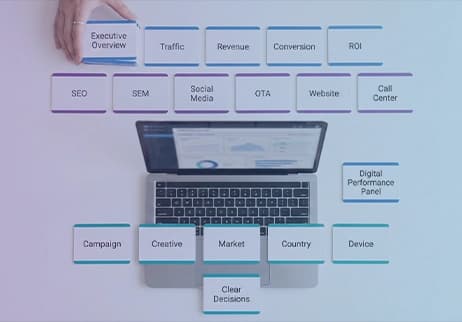
- Then designs the panel architecture: Top-level overview tab (traffic, revenue, conversion, ROI), Channel tabs (SEO, SEM, SMM, OTA, web, call center), Detail tabs (campaign, creative, country/market, device breakdown),
- Designs clean, readable charts aligned with your brand’s visual language.
SEO, SEM, SMM and Ads Reporting Panels
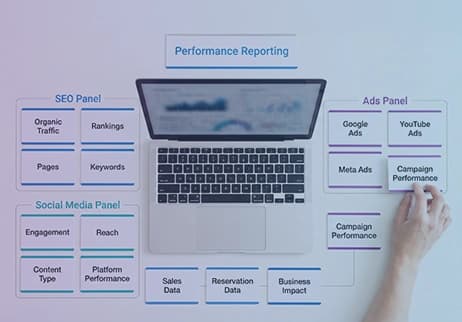
- Consolidates SEO performance (organic traffic, rankings, page & keyword breakdowns) into a single tab,
- Displays Google Ads, YouTube Ads, and Meta Ads campaigns in one ads panel,
- Analyzes social media performance via social media reporting with engagement, reach, and content-type insights,
- Shows ad + SEO performance alongside sales/booking data.
Sales & Conversion Reports and Data Analysis
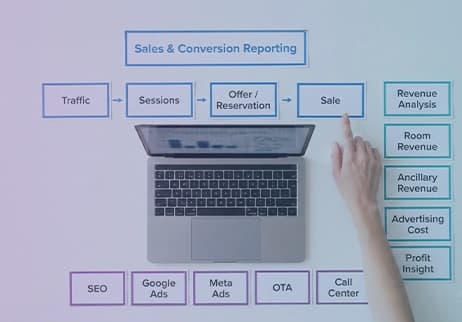
- Visualizes the traffic → sessions → quote/booking → sales cycle,
- Compares conversion rates across channels (SEO, Google Ads, Meta, OTA, call center),
- Reports which campaign/content/market performs better for data-driven sales growth,
- Shows revenue analysis (room revenue, additional services) next to ad spend in the same panel.
Why Looker Studio Reporting with DGTLFACE?
Not Just Reports—Strategy and Action-Driven Dashboard Design
- What happened? (data)
- Why did it happen? (interpretation)
- What should we do next? (action)
- Summary KPIs that support decisions,
- Red flags that highlight problems,
- Channel/segment breakdowns that reveal opportunities.
Hotel & Tourism-Focused Looker Studio Expertise
- Is experienced in connecting PMS & OTA data into Looker Studio,
- Understands key tourism metrics such as occupancy, RevPAR, market-based performance, OTA vs direct channel balance,
- Has seen in the field how hotel management and sales teams interpret data.
The Trio: Data Analysis + Reporting + Consulting
- Builds the panels,
- Analyzes the data regularly,
- Adds competitor/market comparisons via benchmark analysis,
- Runs periodic meetings with management and marketing teams to interpret results,
- Provides recommendations for upcoming campaigns, seasonality, and budget planning.
Micro Layer
Looker Studio How to Use It?
- Connect data sources (GA4, Ads, Sheets, PMS/OTA data, etc.),
- Define the KPI list required for the report,
- Split dashboards by audience (management / marketing / operations),
- Choose chart types that are simple and clear,
- Add filters, date ranges, and segmentation options,
- Configure automated email and sharing settings,
- Review regularly and remove everything unnecessary.
Looker Studio Dashboard Examples – Core Blocks
- Overview (traffic, revenue, conversions, ROI, key trends),
- Channel performance (SEO, SEM, SMM, OTA, web, call center),
- Market/country performance,
- Device (mobile/desktop) breakdowns,
- Campaign/content/creative analysis,
- Sales & conversion funnel.
For Hotels: Performance Report
- Occupancy, ADR, RevPAR, total revenue blocks,
- Channel mix (OTA, web, agency, call center),
- Market (country/language) performance,
- Campaign and seasonal comparisons,
- Impact of digital channels (SEO, Ads, social) on bookings/revenue,
- Guest satisfaction and review metrics.
Automated Email Reporting Tips
- For management: one-page summary PDF or link,
- For marketing: more detailed interactive dashboards,
- Different cadences: weekly – monthly – seasonal,
- Instead of too many emails: clear and consolidated reporting flow.
Why Multi-Channel Reporting Matters
- If SEO, ads, and social are reviewed separately, you miss the full picture,
- If OTA + web + call center are not viewed together, sales optimization remains incomplete, That is why metrics such as call volume, answer rate, SLA, and sales contribution should be connected to the dashboard within a Call Center Performance Analysis framework, not treated as a separate operational screen
- If PMS data is not combined with marketing data, the question “we spent money—what happened?” remains unanswered.
DGTLFACE Hakkında Questions
See the most common questions about Looker Studio reporting at a glance.
Before deciding on dashboard setup, data-source connections, access permissions, and KPI structure, review the Looker Studio reporting FAQ page.
This information is compiled from DGTLFACE’s internal documentation and project experience in Looker Studio-based reporting, hotel performance dashboards, and multi-source data integration processes.