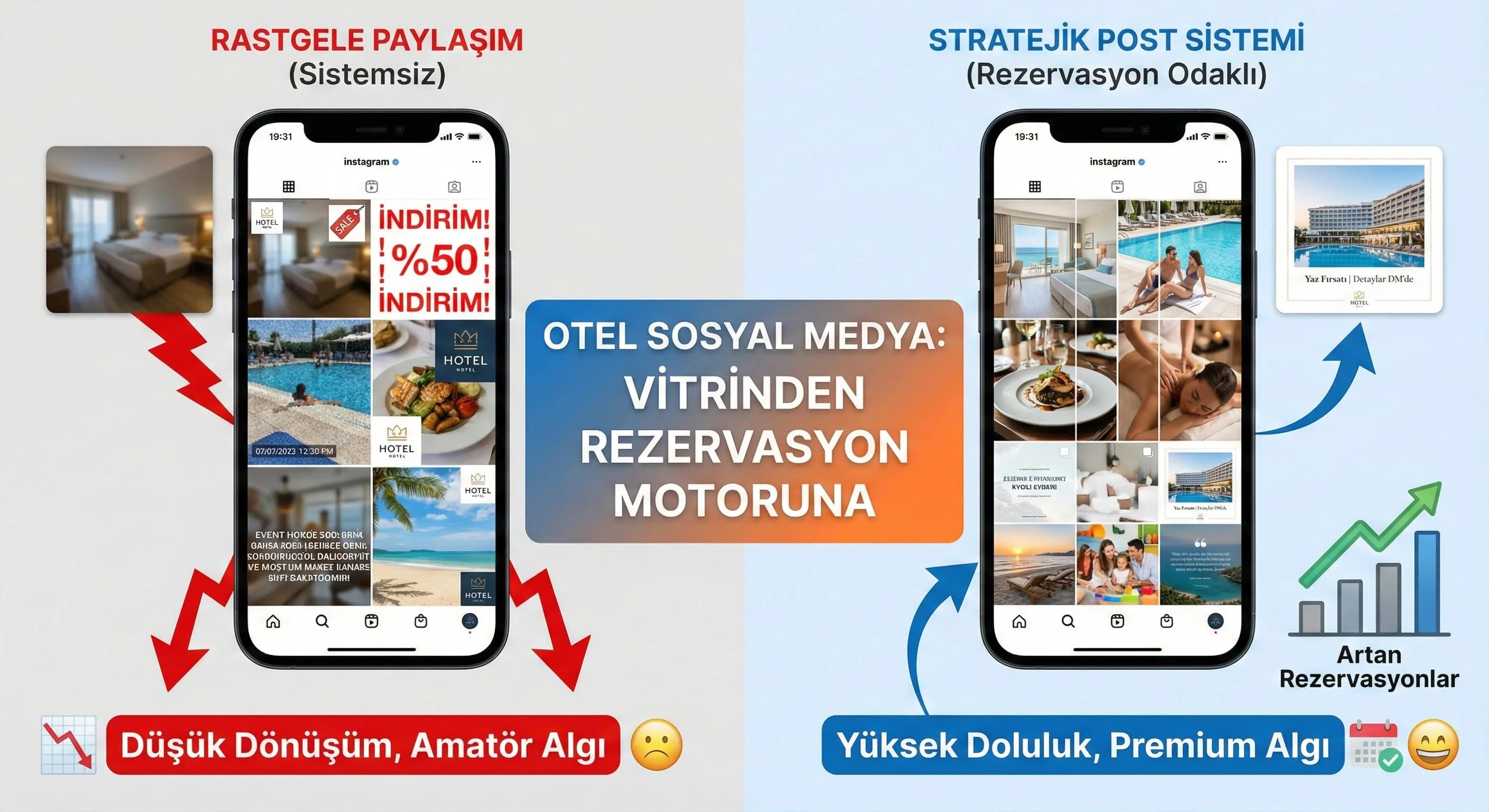
1. Sample feed grid: Set up system with 9/12 post set
3. Feed structure and content types
Feed is your hotel's showcase; Content types are the product groups in the showcase. The best hotel feeds rotate different post types within a consistent design system, rather than “the same photo over and over.” Thus, an "active and planned brand" appearance is created in the eyes of both the algorithm and the user.
Basic hotel post types (set logic)
- •Room posts: comfort + detail + “why should I stay here?”
- •Facility posts: pool, beach, spa, kids club
- •Restaurant/Bar: signature flavor + atmosphere
- •Experience: event, show, activity, destination
- •Campaign/offer: price/advantage + limited message
- •Guest review: social proof
- •FAQ posts: cancellation policy, check-in/out, child concept, etc.
Single post vs carousel
The individual post is ideal for “one message”; Carousel is powerful for both transformation and education. In hotels, carousels work best for:
- •Room introduction (5 frames: atmosphere → detail → feature → concept → CTA)
- •Experience series (day program, activities)
- •FAQ (3–5 questions)
- •Campaign (benefits + conditions)
What should I do?
- • Move room and FAQ content to the carousel.
- • Support experience posts with singular + story series.
- • Simplify your campaign posts into 2–3 frames instead of a “single frame brochure”.
4. Editing room, pool, restaurant and experience photos
The success of hotel content; It is as much composition and narrative as photographic selection. The “emotion first, then information” rule gives information while maintaining premium perception. The first shot (or first look) gives the emotion; In the second layer comes information: feature, concept, advantage.
“Emotion first, then knowledge” composition
- •Emotion layer: atmosphere, light, space, framing
- •Information layer: short headline + 1 bottom line (max)
- •Evidence layer: badge/icon (e.g. “Adults Only”, “All Inclusive”, “Spa”, “Kids Friendly”)
- •CTA layer: very minimal (stronger in story)
Room posts: 3 square model
- •The “feel” frame of the room (large, spacious)
- •Detail (bathroom, view, bed, material)
- •“Why” (m², concept, exclusivity) + very minimal CTA
Pool/beach: crowd management
The biggest risk in pool/beach photos; chaos and low premium perception. “Spaciousness” must be preserved through framing and space management.
Restaurant: balance of taste + atmosphere
Instead of just shooting the plate, the "venue + service + taste" trilogy is more convincing. Appetite in B2C; It produces a quality signal in B2B.
What should I do?
- • Set 3 framing standards for each category.
- • Fix photo preset (color/contrast).
- • Select the first frame for “emotion”; move the information to the 2nd layer.
5. Text area, price/CTA usage
The most common mistake in hotel feeds: adding too much text and prices to the image. This reduces the premium perception and impairs readability. The right approach: to keep the text minimal in the image, the details clear in the caption, and the CTA to a single channel.
How should I place price and campaign information in the image?
Clear answer: Give the price/offer message in the image with a single line headline + a small "badge"; Move the conditions and details to the caption. Instead of writing multiple prices/terms in the image, divide “benefits” and “terms” into separate squares in the carousel.
Price/CTA design rules (practical)
- •Price is on one line, in a size that is readable but not shouty.
- •Accent like “%/discount/limited” 1 piece
- •CTA: single (e.g. “WhatsApp for booking”)
- •Logo + CTA + price will not be “dominant” at the same time (one is main)
Mini Check
- • Are there more than 2 numbers in the image? (usually error)
- • Is there more than one CTA? (web + DM + phone = error)
- • Does the text overwhelm the photo?
What should I do?
- • Set a “1 post” rule on campaign posts.
- • Instead of exaggerating the price, make the benefit clear (e.g. “Free transfer”).
- • Move CTA to story; make it smoother in the feed.
6. Sample post sets and campaign templates
The fastest profit for hotel marketing teams is not “designing a post one by one”; is to produce sets. Set of 9/12 hides; It provides rapid adaptation to changes in season, destination and concept. Set logic prevents the feed from being dispersed even during campaign periods.
How to plan a hotel social media set of 9 or 12 posts?
Straightforward answer: Divide the set into 3: (1) Perception posts (room/experience), (2) Trust posts (guest review/FAQ), (3) Offer posts (campaign). 5 perceptions + 2 trust + 2 offers in a set of 9; A balance of 7 perception + 3 trust + 2 offer in a set of 12 works well.
Example 9-set distribution
- •1–2: Room (feel + detail)
- •3: Experience (activity/show)
- •4: Facility (pool/beach/spa)
- •5: Restaurant (atmosphere + signature flavor)
- •6: Guest review (social proof)
- •7: FAQ (3 questions)
- •8–9: Campaign (benefit + minimal CTA)
What should I do?
- • Make the 9-piece set the “core set” at the beginning of the season.
- • Destination variant available: Antalya/Belek/Side/Kemer/Bodrum/Alanya.
- • Put the campaign “limited” in the set; brochure the feed.
7. Conclusion and rapid implementation plan
Hotel post design; When it is systematized with photo selection + minimal text + correct CTA balance + set planning, even campaign periods proceed consistently. The purpose of the model in this guide; It prevents the marketing team from starting “from scratch every time” and transitions it to a workable template layout in 2 weeks.
8. Download 9/12 Post Social Media Design Checklist for Hotels — Creative / Hotel Post Design System (v1.0)
Download 9/12 Post Social Media Design Checklist for Hotels — Creative / Hotel Post Design System (v1.0)
This asset is prepared to transform your hotel Instagram feed into 9/12 post sets in the balance of room-facility-experience-trust-campaign. It standardizes the use of price/CTA without disrupting the premium perception and accelerates set production during campaign periods. It clarifies the tasks within the team with a 14-day sprint plan.
Kim Kullanır?
Hotel sales-marketing team, social media manager, designer/agency and GM/owner.
Nasıl Kullanılır?
- Collect the last 30 posts; Check set balance in 9-up view.
- Score and prioritize room/facility/experience and price/CTA errors with the checklist.
- Produce a set of 9/12 post templates in a 14-day sprint and connect them to the publication flow.
Ölçüm & Önceliklendirme (Kısa sürüm)
- ▢ ✅ Is there a plan for a 9-piece set? (5 perception + 2 trust + 2 offer)
- ▢ ✅ Is there a plan for a set of 12? (7 perceptions + 3 trust + 2 offers)
- ▢ ✅ Are the room posts in order?
- ▢ ✅ Are the resort posts (pool/beach/spa) balanced?
- ▢ ✅ Are restaurant/experience posts repeat-free?
- ▢ ✅ Are guest review posts a monthly routine?
- ▢ ✅ Are there FAQ posts (3–5 questions)?
- ▢ ✅ Is the "emotion first, then information" rule applied?
- ▢ ✅ Is the 3 square model used in room posts?
- ▢ ✅ Is crowd/chaos managed in pool/beach images?
- ▢ ✅ Is there a balance of “atmosphere + taste” in restaurant posts?
- ▢ ✅ Is the preset/color scheme consistent?
- ▢ ✅ Are there more than 2 numbers in the image? (usually error)
- ▢ ✅ Is CTA the only one? (web or DM or WhatsApp)
- ▢ ✅ Is price/advantage the only message?
- ▢ ✅ Have the conditions been moved to caption?
- ▢ ✅ Do campaign posts spoil the perception of premium?
PDF içinde: Problem→Kök Neden→Çözüm tablosu + 14 gün sprint planı + önce/sonra KPI tablosu
Bir Sonraki Adım
Let's clarify the room/facility/experience balance and price/CTA errors in your current feed and create a 2-week plan.