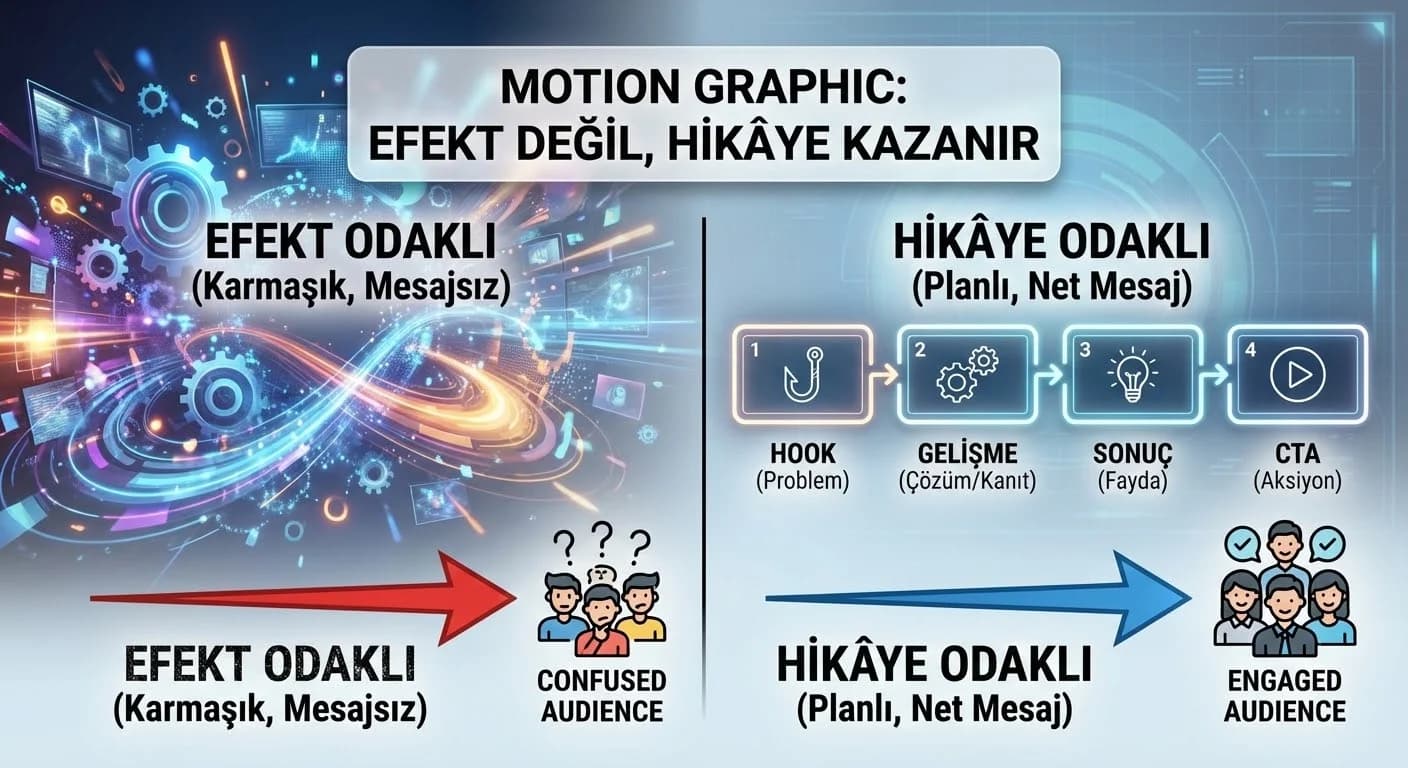
1. What is Motion Graphics and Where Does It Make a Difference?
Motion graphic accelerates perception by combining “image + text + motion”. Since the user makes his/her decision within seconds, especially on social platforms, motion; It provides the advantage of attracting attention and conveying the message quickly. On the web side, it makes the "brand promise" felt on the first screen in areas such as hero video.
What is motion graphics and in what situations should it be used?
Clear answer: Motion graphics; It is a type of video that quickly conveys the message by combining text and graphic elements with movement. It is most effective on "hard to explain" topics such as product/feature description, campaign announcement, hotel experience promotion, dashboard/report.
☑ Mini Check:
- •Does it take 3–4 sentences to convey the message with a static visual? → motion is a good candidate
- •Is there a “problem/promise” that will arouse curiosity in the first 3 seconds?
- •Are you trying to convey more than one message in one video? (mistake)
What should I do?
- • Reduce the message to one sentence (one promise).
- • 3–5 scene storyboards are created.
- • Choose format: 9:16 or 16:9?
- • Plan the CTA from the beginning (not add it later).
2. Story Structure (Introduction-Development-Solution)
In Motion, the story is not as long as the movie script; but the skeleton works the same. The purpose of the short form video: first make you feel the problem/promise, then show the solution, then ask for a single action.
Micro Story Template (10–20 sec)
- •Introduction (0–3 sec): Hook (problem/promise/contrast)
- •Development (3–12 sec): evidence/feature/experience in 2–3 scenes
- •Solution (12–18 sec): net result (benefit)
- •Finale (18–20 sec): CTA + ending/stinger
“One Message” Rule
1 main message in a motion video; 1 support message is enough. The third message is usually “noise”.
Here: 10–20 s timeline (0–3 / 3–12 / 12–18 / 18–20).
What should I do?
- • Write the message in one sentence (for whom + what benefit).
- • Limit development to 2–3 scenes.
- • “Show” the solution (icon/number/before-after).
- • Use one CTA in the finale.
3. Hook and the First 3 Seconds
In social video, the first 3 seconds are the fate of the video. Hook is not “yelling”; is to leave a question in the mind of the viewer. Hook works well in three types: problem, promise, contrast.
What should I do to attract attention in the first 3 seconds?
Straightforward answer: Put Hook in the first frame; use one short sentence; Give strong contrast (before/after, error/solution) or clear promise (I explain X in 10 seconds). Use visual movement as much as it "carries the message", do not embellish.
Hook Formulas (Practical)
- •Problem: “Why aren't the videos watched?”
- •Promise: “Clarify the message in 10 seconds.”
- •Contrast: “The story wins, not the effect.”
- •Issue: “Tell it in 3 scenes.”
☑ Mini Check:
- •Does the Hook sentence exceed 7–10 words? (abbreviate)
- •Is the main word read in the first frame?
- •"What will I watch?" in the first 3 seconds. Is it clear?
What should I do?
- • Write 2 alternatives for Hook and test them.
- • Message in the first frame; Evidence in the second frame.
- • Speed up post-hook “development” (no unnecessary intros).
4. Logo/Stinger and Ending Structure
Ending; is the “remembering” point of the video. If the logo/stinger is used well, the brand signal will be strengthened; If used badly, the audience will be disconnected. Rule: ending should be short, clean and related to the CTA.
Ending Template (2–3 sec)
- •0.5 sec: Logo/stinger
- •1.0 sec: short promise/concluding sentence
- •1.0 sec: CTA (single channel)
The “Logo in Every Frame” Trap
If the logo watermark is not required, the logo will produce “noise” in each frame. Brand cues (color/typography) may already be sufficient.
What should I do?
- • Limit the ending to 2–3 seconds.
- • Connect CTA to single channel (web/DM/WhatsApp).
- • Make the Stinger match your visual language.
5. Motion Scenarios for Hotel and B2B
In hotel and B2B, motion is established with the same system, only the "evidence type" changes. Proof in the hotel: experience, atmosphere, social proof. Proof in B2B: feature, process, number and result.
Hotel Scenarios (Facility/Experience)
- •Experience motion: 3 scenes “feeling → evidence → CTA”
- •Facility motion: category icons + short benefit
- •Season/destination: Regions such as Antalya/Belek/Side/Kemer/Bodrum as “support element” (not spam)
Example 12 sec Hotel Stream (Assumption):
- •0–2 sec: "Vacation plan? Feel the hotel in 3 scenes."
- •2–8 sec: beach → pool → restaurant (icon + 2 words)
- •8–12 sec: “Select date – get offer” + CTA
B2B Scenarios (Product/Feature Explainer)
- •Problem: “Are the reports messy?”
- •Solution: 2 features + 1 result
- •Evidence: number/before-after (single metric)
How to write a motion graphic scenario for hotel and B2B?
Straightforward answer: Write the single message first (for whom + benefit), then plan 3–5 scenes (hook → evidence → solution → CTA). Evidence scenes at the hotel experience/facility view; In B2B it is a feature/results graph. A logo/stinger and a single CTA are required in the ending.
Here: Hotel vs B2B “stage cards” comparison chart.
What should I do?
- • In the hotel: visual sensation + short text; In B2B: clear text + simple graphics.
- • 1 CTA and 1 channel in each video.
- • Do not enter production without approving the storyboard.
6. Simple Animation Principles (Timing, Easing, Overshoot)
This guide is not software focused; But there are three principles that determine motion quality the most. The “stiff and linear” animation feels amateur; Correct easing and timing creates a premium perception.
3 Basic Principles
- •Timing: the duration of everything (too fast → incomprehensible, too slow → boring)
- •Easing: input/output smoothing (non-linear)
- •Overshoot: small overflow/return (use in moderation)
What should I do?
- • Keep text animations simple (fade/slide).
- • Publishing without using ease.
- • Use Overshoot only on emphasis (not everywhere).
7. Conclusion and Implementation Plan
Success in motion graphics; It comes with story + scene plan + hook + CTA, not “effect”. In teams with storyboards and flow diagrams, revision is reduced, message clarity increases, and videos perform better. If you follow this guide according to 10–20 second formats, both the retention on social platforms and the web hero video effect will increase.
8. Download Motion Graphic Scenario & Storyboard Checklist — Creative / Motion Storytelling (v1.0)
Download Motion Graphic Scenario & Storyboard Checklist — Creative / Motion Storytelling (v1.0)
This asset is designed to quickly set up the hook–story–CTA flow in 10–20 second motion videos. Thanks to the storyboard and stage plan, the message becomes clear before production begins and the revision cycle is shortened. It also includes how to variant the same skeleton for hotel and B2B scenarios.
Kim Kullanır?
Agency manager, content strategist, motion designer, hotel/B2B marketing team.
Nasıl Kullanılır?
- Write single message: for whom + benefit (1 sentence).
- Create a 3–5 scene storyboard: hook → evidence → solution → CTA.
- Produce template and sample flows in a 14-day sprint and connect them to the publication routine.
Ölçüm & Önceliklendirme (Kısa sürüm)
- ▢ ✅ Hook in the first frame?
- ▢ ✅ Is Hook in the 7–10 word band?
- ▢ ✅ “What will I watch?” Is it understood in 3 seconds?
- ▢ ✅ Has the hook type been selected? (problem/promise/contrast/number)
- ▢ ✅ Is the number of scenes in the range of 3–5?
- ▢ ✅ Is there a single message in each scene?
- ▢ ✅ Does development show evidence in 2–3 scenes?
- ▢ ✅ Does the final scene contain CTA + ending?
- ▢ ✅ Is timing (speed) understandable?
- ▢ ✅ Was Easing used?
- ▢ ✅ Is overshoot only during highlight moments?
- ▢ ✅ Is the text animation plain?
- ▢ ✅ Is CTA the only one?
- ▢ ✅ Is there only one channel? (web/DM/WhatsApp)
- ▢ ✅ Ending 2–3 seconds?
- ▢ ✅ Is the logo/stinger dosage correct?
PDF içinde: Problem→Kök Neden→Çözüm tablosu + 14 gün sprint planı + önce/sonra KPI tablosu
Bir Sonraki Adım
Let's remove the first 3 seconds, scene flow and CTA errors in your existing videos and make a 2-week improvement plan.
Frequently Asked Questions
What is motion graphics and in what situations should it be used?▾
How to construct a story with motion graphics?▾
What should I do to attract attention in the first 3 seconds?▾
How to write a motion graphic scenario for hotel and B2B?▾
How many seconds should motion videos be and how many scenes are ideal?▾
When to use logo/stinger?▾
İlgili İçerikler