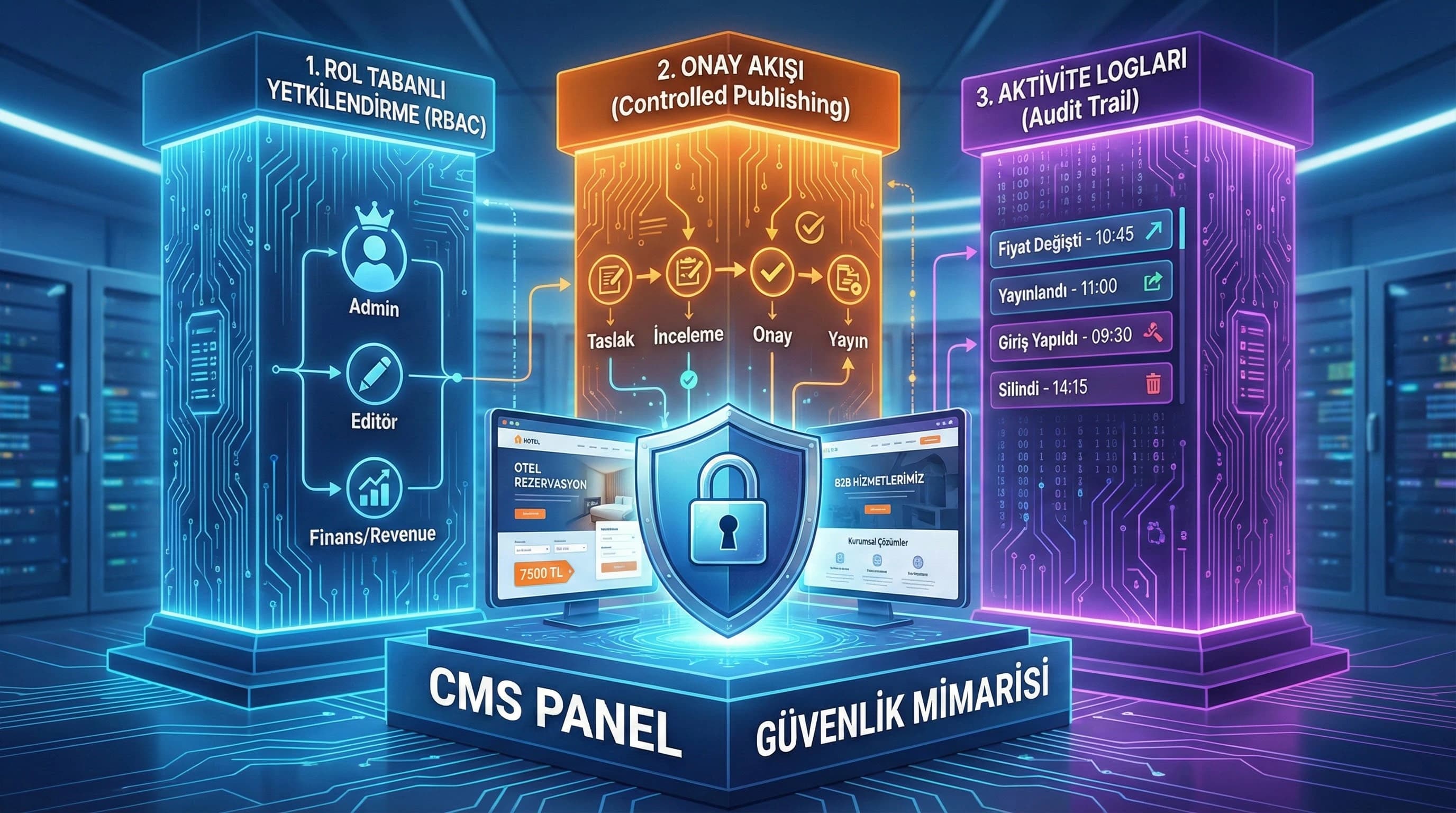
1. What is Role Based Access (RBAC)?
RBAC (Role-Based Access Control) collects users under roles instead of overwhelming them with individual permissions and defines clear authority limits for each role. The purpose of this approach is not to “ban”; To reduce error and abuse with the principles of least privilege and separation of duties. For example, the marketing team may update the campaign text in a hotel; but the campaign price field can only be changed with the “Revenue/Finance” role and the publication must be approved.
Two conditions are critical for RBAC to work well in practice: 1. Determination of roles according to job description (organization map), 2. Designing the permissions as content type + field level + action level (view/edit/publish/delete).
What is RBAC, how to install it in the CMS panel?
Short answer: First, extract your roles, then determine the “can see / edit / publish / delete” actions for each role; Lock critical fields (price, campaign, KVKK) with separate permissions and bind publications to approval. • RBAC is not just “page access”; In most projects, the real risk comes from the field level. • The "publishing" authority should be designed separately from the "editing" authority.
☑ Mini Check:
- • Can anyone with “Edit” privileges also do “Publish”? (Risk)
- • Are there separate permissions for price/campaign areas?
- • Is access to areas containing KVKK limited?
What should I do?
- • Create a list of roles by organization (IT, content, marketing, sales, revenue/finance).
- • Separate actions: view / edit / publish / delete / manage users.
- • Lock critical areas with “field-level permission”.
- • Subject Publish to approval; Define emergency procedure.
- • Review roles at least once a year (365).
2. CMS User Types (Admin, Editor, Author, View Only, etc.)
In many projects, the mistake is to make all users Editors so that the number of roles is small. However, seemingly small role separations increase both security and editorial speed. The goal here is; The aim is not to establish a complex “enterprise IAM”, but to clarify control with the right minimum set of roles.
Recommended basic roles (core set)
The set below covers most teams in hotel and B2B projects across Türkiye:
- •Admin (System): user management, role/permission management, system settings
- •Content Admin / Publisher: publication calendar, approval, publish/unpublish
- •Editor: content editing, adding media, draft management
- •Author: content production, drafting (no publishing)
- •Reviewer: review, comment, approval/disapproval (edit limited)
- •Viewer (View only): access for reporting/auditing purposes
- •Revenue/Finance (Hotel): price/room/package critical fields (narrow scope)
- •Compliance/Legal (KVKK): areas containing personal data, permission control (narrow scope)
Role-authority matrix (sample table – application-oriented)
Note: This table complies with the “RBAC role–authority matrix” media recommendation.
| Action / Field | admin | Publisher | Editor | Author | Reviewer | Revenue/Finance | viewer |
|---|---|---|---|---|---|---|---|
| User/Role management | |||||||
| Content editing | ⚠️ (comment) | ⚠️ (own area) | |||||
| Publish / unpublish | |||||||
| Price field change | ⚠️ (approval) | ||||||
| Campaign condition/CTA | ⚠️ (draft) | ⚠️ (excluding price) | |||||
| Log viewing | |||||||
| Delete | ⚠️ (restricted) | ⚠️ (restricted) |
☑ Mini Check:
- • Is "Delete" privilege only available to Admin?
- • Is the Revenue/Finance role field-based? (room/package price)
- • Is the Viewer role sufficient for audits and reports?
What should I do?
- • Drop the “Everyone is an editor” approach; Separate publish and user management.
- • Define specific roles/permissions for fields that affect revenue (price, campaign).
- • Restrict access to KVKK areas; Use the viewer role for control.
- • Restrict deletions and bind them to the second confirmation.
- • Define roles in terms of “business” rather than “owner.”
3. Content Approval Processes (Controlled Publishing)
RBAC alone is not enough; because the source of most errors is not “unauthorized access” but incorrect publication under speed pressure. Controlled publishing; It reduces this risk by clarifying the draft-review-approval-publication chain. Especially in hotels, campaign contents are updated quickly during destination seasons such as Antalya, Belek, Side, Kemer and Bodrum; During these periods, “urgent broadcast” needs increase. Good approval flow; It manages speed and security at the same time.
Minimum feasible approval flow (example)
- •Author/Editor: creates draft → sends to “Review” status
- •Reviewer: checks content + SEO + risk → approves / rejects
- •Publisher: publishes (and schedules if necessary)
- •Revenue/Finance: “mandatory additional confirmation” if the price/campaign area has changed
Critical approach: When "publishing" authority is concentrated in a single role, the probability of the error making its way to production decreases significantly.
How should the go-live/approval process be designed?
Short answer: Limit publish authority, require draft→review→publish steps, and add second approval for critical changes like price/campaign. • Define a separate procedure for “urgent change”: who can publish, under what conditions, for what period of time? • Each approval step should produce a log record (who approved, which version).
☑ Mini Check:
- • Publish in a single role?
- • Is there a second approval for price/campaign changes?
- • Is the emergency release procedure written?
What should I do?
- • Standardize Draft/Review/Approved/Published statuses.
- • Limit Publish role; Add scheduled release and rollback.
- • Implement mandatory second approval on critical field changes.
- • Grant time-limited authorization for “immediate publish” (e.g. temporary publish).
- • Make approval steps visible with logs and notifications.
4. Logging and Activity Tracking (Activity Logging)
Logs; It is not a “nice report” but a chain of evidence. The most critical question in a crisis is: Who changed what and when? In panels with RBAC and logging setup, you can find the answer to this question in seconds instead of minutes; This accelerates both crisis management and rollback processes. Since price/campaign errors can turn into loss of income, especially on the hotel side, logs are not an "IT detail" but directly "job security".
What should be kept in logs? (minimum set)
- •Who: user id, role, IP/device (if applicable)
- •What: content type, content id, field name, old/new value (masked)
- •When: timestamp, timezone
- •How: action type (edit/publish/unpublish/delete/login)
- •Context: relevant approval step, ticket/issue reference (if applicable)
KVKK note: In areas containing personal data, the "old/new value" log should be kept by masking/summarizing; Logging raw data may pose risks.
Login security, IP/2FA and log correlation
“Panel security” often starts on the login side: • 2FA requirement (at least publisher/admin) • IP allowlist (access via IT/VPN) • SSO (enterprise) • Session management (timeout, device recognition) When logs are combined with this control layer, you can catch suspicious behavior faster: for example, serial publishing operations from different IPs at night can generate anomaly alarms.
☑ Mini Check:
- • Is 2FA mandatory for Admin/Publisher?
- • Are logs kept for at least 90–365 days? (according to need)
- • Is there automatic notification of critical field changes?
What should I do?
- • Keep “login / edit / publish / delete” logs in a separate category.
- • Make field-level log mandatory in critical areas (price, campaign).
- • Set log retention policy (365 days recommendation; as per need).
- • Add anomaly rules (multiple publish, different IP, night hours).
- • Apply log masking and access restrictions in KVKK areas.
5. Secure Panel Architectural Examples for Hotels and B2B
Secure panel architecture is not “the same in every project”; Because the risk areas are different in hotels and B2B. Areas that affect revenue in the hotel (price/campaign/room availability) and seasonal pressure come to the fore; In B2B, service pages, reference/case contents and brand reputation-focused publications come to the fore. Still, the common roof; It is the governance + controlled publishing + audit logs approach.
Hotel scenario: how to maintain price/campaign coverage?
- •Campaign text: marketing team drafts, reviewer checks
- •Campaign price: only Revenue/Finance regulates
- •Publication: Publisher does
- •Post change: automatic log + notification (IT + revenue)
Mini example: If the "15% discount" text accidentally becomes "51%" in an early booking campaign in Side, logs and confirmation flow allow you to quickly undo the error; It also clarifies responsibility.
B2B scenario: service pages and case contents
- •Service page: editor edits, reviewer verifies (promise/compliance check)
- •Case study: evidence (KPIs) and permissions are checked
- •Publication: publisher makes changes, changes are versioned
KVKK focused areas and access restrictions (Technical SEO + compliance note)
If there are areas in the panel that touch personal data (form records, CRM syncs, customer notes), access restrictions must be defined correctly. It is important that the RBAC setup progresses in harmony with /software/kvkk-compliance-service and the data security approach /digital-analysis/kvkk-data-security.
- •Link: /software/kvkk-compliance-service
- •Link: /digital-analysis/kvkk-data-security
- •Link: /software/website-and-software
☑ Mini Check:
- • Does the price field have a separate role in the hotel?
- • Are case contents approved in B2B?
- • Is access to KVKK areas and log viewing limited?
What should I do?
- • Set up the revenue/finance role for the hotel on a field-based basis.
- • Add the “promise and evidence” check to the reviewer step in B2B.
- • Protect KVKK areas with separate permission; Limit access to logs.
- • Write a post-broadcast rollback procedure.
- • Update the role matrix as the team grows (365 day cycle).
6. (Mini Section That Makes a Difference) Close the Competitor Gap: Governance + Incident-Ready Panel
Many competing content simply say “RBAC exists”; But in real life, loss comes from lack of governance: role matrix is not documented, approval steps are relaxed, logs are not monitored. Publishing incorrect content and price/campaign errors in CMS installations without role-based architecture; It may result in serious loss of income and reputation. So think of your panel as “incident-ready”: alarm, retrieval, chain of evidence and responsibilities should be clear.
☑ Mini Check:
- • Are there notifications and alarms for critical changes?
- • Is the unpublishing process 1–2 steps?
- • Is the Viewer role active for the audit?
What should I do?
- • Document the role-authority matrix and share it with teams.
- • Make approval flow the “standard” not the “exception”.
- • Examine logs regularly; Define anomaly rules.
- • Set up automatic post-change notifications for critical fields.
- • Create an annual (365) security review and role update calendar.
7. Conclusion: Secure panel means fast team
RBAC, confirmation flow and logging; It provides not only security but also operational speed. Because when the right boundaries are set, the content team produces without fear, IT teams focus on improvement rather than crisis, and management asks “who did it?” gets a clear answer to the question. This trio in multi-user hotel and B2B projects across Türkiye; It takes the panel out of chaos and into controlled growth.
8. CMS RBAC & Approval Flow Design Template (v1.0)
Download CMS RBAC & Approval Flow Design Template — Software / CMS security architecture (v1.0)
This template helps you quickly design the RBAC role-authority matrix and controlled publishing (approval flow) setup in your CMS panel. It clarifies the question of "who does what with what approval" in order to securely manage price/campaign areas in hotel projects and service/case contents in B2B projects.
Kim Kullanır?
IT leader, product owner, content leader, marketing/revenue manager and agency project manager.
Nasıl Kullanılır?
- Fill in the roles and content types (based on your current team structure).
- Check permissions at action + field level (view/edit/publish/delete).
- Select the approval flow (standard + critical field additional approval) and add log/alert rules.
Ölçüm & Önceliklendirme (Kısa sürüm)
PDF içinde: Problem→Kök Neden→Çözüm tablosu + 14 gün sprint planı + önce/sonra KPI tablosu
Bir Sonraki Adım
Clarify the role-authority matrix, approval flow and logging policy for your hotel and B2B team.
Frequently Asked Questions
What is RBAC, how to install it in the CMS panel?▾
Which roles should have which powers?▾
Who should manage price and campaign areas on hotel and B2B sites?▾
How should I log CMS user actions?▾
Everyone can change everything on the panel, how do I limit it?▾
If the approval flow doesn't work quickly, won't the team slow down?▾
What should I pay attention to in the panel in terms of KVKK?▾
İlgili İçerikler